QEMU模拟器原生支持GDB调试器,这样可以很方便地使用GDB的强大功能对操作系统进行调试,如设置断点;单步执行;查看调用栈、查看寄存器、查看内存、查看变量;修改变量改变执行流程等
编译调试版内核
对内核进行调试需要解析符号信息,所以得编译一个调试版内核。
$ cd linux-4.4.15
$ make menuconfig
$ make -j 2
这里需要开启内核参数CONFIG_DEBUG_INFO和CONFIG_GDB_SCRIPTS。GDB提供了Python接口来扩展功能,内核基于Python接口实现了一系列辅助脚本,简化内核调试,开启CONFIG_GDB_SCRIPTS参数就可以使用了(默认是打开的)
Kernel hacking  --->
    [*] Kernel debugging
    Compile-time checks and compiler options  --->
        [*] Compile the kernel with debug info
        [*]   Provide GDB scripts for kernel debugging
编译busybox
用来生成简易的文件镜像
busybox简介
BusyBox是一个遵循GPL协议、以自由软件形式发行的应用程序。Busybox在单一的可执行文件中提供了精简的Unix工具集,可运行于多款POSIX环境的操作系统,例如Linux(包括Android[6])、Hurd[7]、FreeBSD[8][9]等等。
busybox是Linux上的一个应用程序 它整合了许多Linux上常用的工具和命令 IBM的一篇关于busybox的文章 文章地址,写的很详细。
busyboxz主要有这些功能
busybox是Linux上的一个应用程序 它整合了许多Linux上常用的工具和命令 由于启动内核还需要一个简单的文件系统和一些命令,而busybox就是用来完成生成简单文件系统的
这里直接下载解压后进入目录,这里给出一个busybox-1.30.0的下载链接
输入: make menuconfig
同样的会进入图形界面,在Settings中勾选Build static binary (no shared libs),然后save就可以了
编译,执行make install ,根目录下就会生成一个_install 文件夹,就是我们编译的结果了。
- 注意
在CentOS 7中,使用static方法编译,需要安装static version of glibc-static libstdc++-static。使用如下命令安装
yum install glibc-static libstdc++-static进入该文件夹_install,进行配置
cd _install
mkdir proc
mkdir sys
mkdir etc
mkdir dev
rm linuxrc
touch init
chmod a+x init
sudo cp -a /dev/{null, console, tty, tty1, tty2, tty3, tty4} dev/ #一个一个复制
编辑init文件,用于内核初始化
#!/bin/sh
echo "{==DBG==} INIT SCRIPT"
mkdir /tmp
mount -t proc none /proc
mount -t sysfs none /sys
mount -t debugfs none /sys/kernel/debug
mount -t tmpfs none /tmp
#mount指令 挂载某个分区到某个文件,这样就将分区与文件建立联系从而访问文件时就可以访问分区。
# insmod /xxx.ko # 加载模块
mdev -s
# We need this to find /dev/sda later
echo -e "{==DBG==} Boot took $(cut -d' ' -f1 /proc/uptime) seconds"
setsid /bin/cttyhack setuidgid 1000 /bin/sh #normal user
# exec /bin/sh #root
这里提及几个常见的指令
insmod: 指定模块加载到内核中
rmmod: 从内核中卸载指定模块
lsmod: 列出已经加载的模块
接着在busybox的_install目录下输入下面的命令打包文件系统
find . | cpio -o --format=newc > ../rootfs.img宿主机MacOs编译调试
之前配置都是在阿里云服务器上进行。需要将生成的rootfs.img和vmlinux,bzImage下载到本地同一个文件夹 mac上安装qemu:
brew install qemu在mac上的启动脚本:#!/bin/sh qemu-system-x86_64 -s \ -m 64M \ -kernel ./bzImage \ -initrd ./rootfs.img \ -netdev user,id=t0, -device e1000,netdev=t0,id=nic0 \ -monitor null \ -smp cores=2,threads=1 \ -cpu kvm64,+smep \ -append "console=ttyS0 root=/dev/ram rw oops=panic panic=1 kalsr" \ --nographic \ #-S 启动gdb调试 #-gdb tcp:1234 等待gdb调试内核模块创建与调试
创建内核模块 首先是源代码程序 arbitrarily_write.c在内核编译根目录下
#include <linux/module.h>
#include <linux/types.h>
#include <linux/kernel.h>
#include <linux/fs.h>
#include <linux/errno.h>
#include <linux/cdev.h>
#include <asm/uaccess.h>
#include <linux/device.h>
#include<linux/slab.h>
#include<linux/string.h>

struct class *arw_class;
struct cdev cdev;
char *p;
int arw_major=248;

struct param
{
    size_t len;
    char* buf;
    char* addr;
};

char buf[16] = {0};

long arw_ioctl(struct file *filp, unsigned int cmd, unsigned long arg)
{

    struct param par;
    struct param* p_arg;
    long p_stack;
    long* ptr;
    struct thread_info * info;
    copy_from_user(&par, arg, sizeof(struct param));

    int retval = 0;
    switch (cmd) {
        case 8:
            printk("current: %p, size: %d, buf:%p\n", current, par.len, par.buf);
            copy_from_user(buf, par.buf, par.len);
            break;
        case 7:
            printk("buf(%p), content: %s\n", buf, buf);
            break;
        case 5:
            p_arg = (struct param*)arg;
            p_stack = (long)&retval;
            p_stack = p_stack&0xFFFFFFFFFFFFC000;
            info = (struct thread_info * )p_stack;

            printk("addr_limit's addr: 0x%p\n", &info->addr_limit);
            memset(&info->addr_limit, 0xff, 0x8);
            // 返回 thread_info 的地址, 模拟信息泄露
            put_user(info, &p_arg->addr);
            break;

        case 999:
            p = kmalloc(8, GFP_KERNEL);
            printk("kmalloc(8) : %p\n", p);
            break;
        case 888://数据清零
            kfree(p);
            printk("kfree : %p\n", p);
            break;
        default:
            retval = -1;
            break;
    }

    return retval;
}

static const struct file_operations arw_fops = {
    .owner = THIS_MODULE,
    .unlocked_ioctl = arw_ioctl,//linux 2.6.36内核之后unlocked_ioctl取代ioctl
};

static int arw_init(void)
{
    //设备号
    dev_t devno = MKDEV(arw_major, 0);
    int result;

    if (arw_major)//静态分配设备号
        result = register_chrdev_region(devno, 1, "arw");
    else {//动态分配设备号
        result = alloc_chrdev_region(&devno, 0, 1, "arw");
        arw_major = MAJOR(devno);
    }
    // 打印设备号
    printk("arw_major /dev/arw: %d", arw_major);

    if (result < 0)
        return result;

    arw_class = class_create(THIS_MODULE, "arw");
    device_create(arw_class, NULL, devno, NULL, "arw");

    cdev_init(&cdev, &arw_fops);
    cdev.owner = THIS_MODULE;
    cdev_add(&cdev, devno, 1);
    printk("arw init success\n");
    return 0;
}

static void arw_exit(void)
{
    cdev_del(&cdev);
    device_destroy(arw_class, MKDEV(arw_major, 0));
    class_destroy(arw_class);
    unregister_chrdev_region(MKDEV(arw_major, 0), 1);
    printk("arw exit success\n");
}

MODULE_AUTHOR("exp_ttt");
MODULE_LICENSE("GPL");

module_init(arw_init);
module_exit(arw_exit);
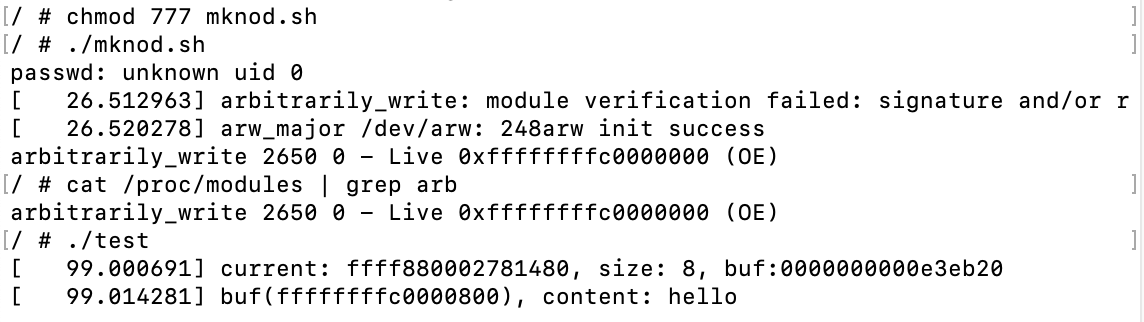
注册了一个 字符设备, 设备文件路径为 /dev/arw, 实现了 arw_ioctl 函数,用户态可以通过 ioctl 和这个函数进行交互。 在 qemu 中创建设备文件,貌似不会帮我们自动创建设备文件,需要手动调用 mknod 创建设备文件,此时需要设备号,于是在注册驱动时把拿到的 主设备号 打印了出来, 次设备号 从 0 开始试 。创建好设备文件后要设置好权限,使得普通用户可以访问 然后是测试代码(用户态调用)test.c
#include <stdio.h>
#include <fcntl.h>
#include <sys/ioctl.h>
struct param
{
    size_t len;
    char* buf;
    char* addr;
};


int main(void)
{
    int fd;
    char buf[16];

    fd = open("/dev/arw", O_RDWR);
    if (fd == -1) {
        printf("open hello device failed!\n");
        return -1;
    }
    struct param p;
    p.len = 8;
    p.buf = malloc(32);
    strcpy(p.buf, "hello");
    ioctl(fd, 8, &p);
    ioctl(fd, 7, &p);

    return 0;
}
打开设备文件,然后使用 ioctl 和刚刚驱动进行交互 接下来是Makefile
obj-m := arbitrarily_write.o
KERNELDIR := /home/haclh/linux-4.1.1(换成自己内核编译目)
PWD := $(shell pwd)
OUTPUT := $(obj-m) $(obj-m:.o=.ko) $(obj-m:.o=.mod.o) $(obj-m:.o=.mod.c) modules.order Module.symvers

modules:
    $(MAKE) -C $(KERNELDIR) M=$(PWD) modules
    gcc -static test.c -o test

clean:
    rm -rf $(OUTPUT)
    rm -rf test
test.c 要静态编译, busybox 编译的文件系统,没有 libc. 把 KERNELDIR 改成 内核源代码的根目录。 同时还创建了一个脚本用于在 qemu 加载的系统中,加载模块,创建设备文件,新增测试用的普通用户。 mknod.sh
mkdir /home
mkdir /home/hac425
touch /etc/passwd
touch /etc/group
adduser hac425
insmod arbitrarily_write.ko
mknod /dev/arw c 248 0
chmod 777 /dev/arw
cat /proc/modules
为了方便对代码进行修改,写了个 shell 脚本,一件完成模块和测试代码的编译、 rootfs.img 的重打包 start.sh
make clean
sleep 0.5
make
sleep 0.5
rm /git/busybox-1.31.1/_install/{*.ko,test}
cp mknod.sh test *.ko /git/busybox-1.31.1/_install/
cd /git/busybox-1.31.1/_install/
rm /git/busybox-1.31.1/_install/rootfs.img
find . | cpio -o --format=newc > ./rootfs.img
在arbitrarily_write目录下
然后 ./start.sh,就可以打包,然后下载

gdb调试
用 qemu 运行内核时,加了一个 -s的参数, qemu 会在 1234 端口起一个 gdb_server ,我们直接用 gdb 连上去即可。
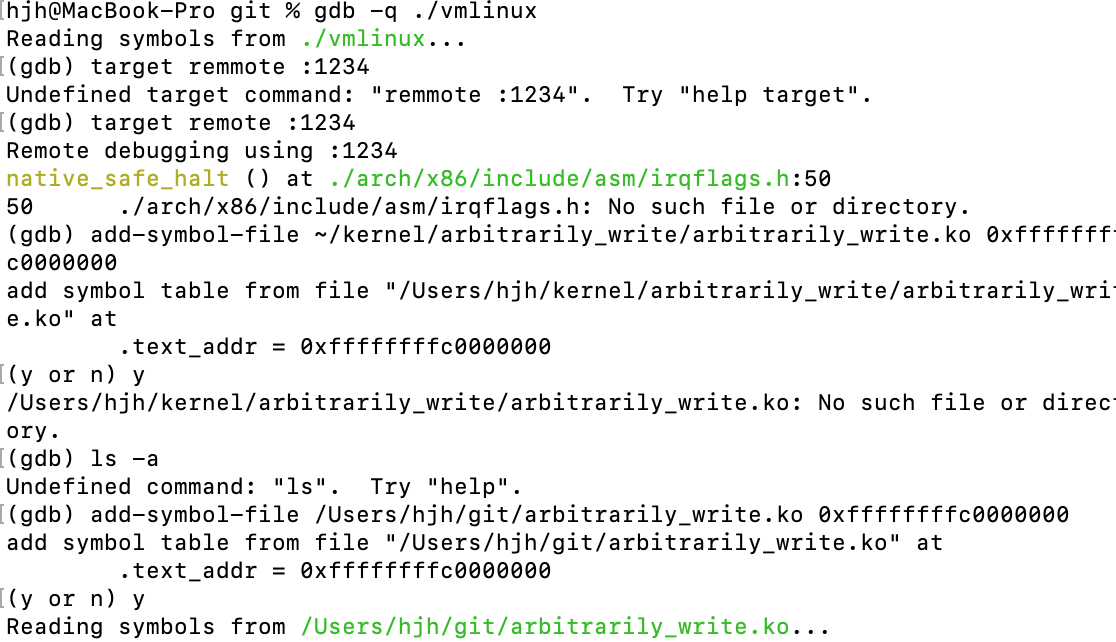 为了调试内核模块,还需要加载 驱动的 符号文件,首先在系统里面获取驱动的加载基地址。
/ # cat /proc/modules | grep arb
arbitrarily_write 2168 0 - Live 0xffffffffc0000000 (O)
/ #
然后在 gdb 里面加载
gef➤  add-symbol-file ~/kernel/arbitrarily_write/arbitrarily_write.ko 0xffffffffa0000000
add symbol table from file "/home/haclh/kernel/arbitrarily_write/arbitrarily_write.ko" at
    .text_addr = 0xffffffffc0000000
Reading symbols from /home/haclh/kernel/arbitrarily_write/arbitrarily_write.ko...done.
gef
此时就可以直接对驱动的函数下断点了
b arw_ioctl
然后运行测试程序 ( test ),就可以断下来了。